


Framer's pricing is on Framer's website. It takes about ninety seconds to read. The plan tiers, editor seat costs, bandwidth limits, and add-on pricing are public, itemised, and easier to compare than agency quotes.
Agency pricing for a Framer website is the opposite. Quotes for the same scope can range several multiples apart, and both ends can be defensible numbers depending on what's actually in the scope.
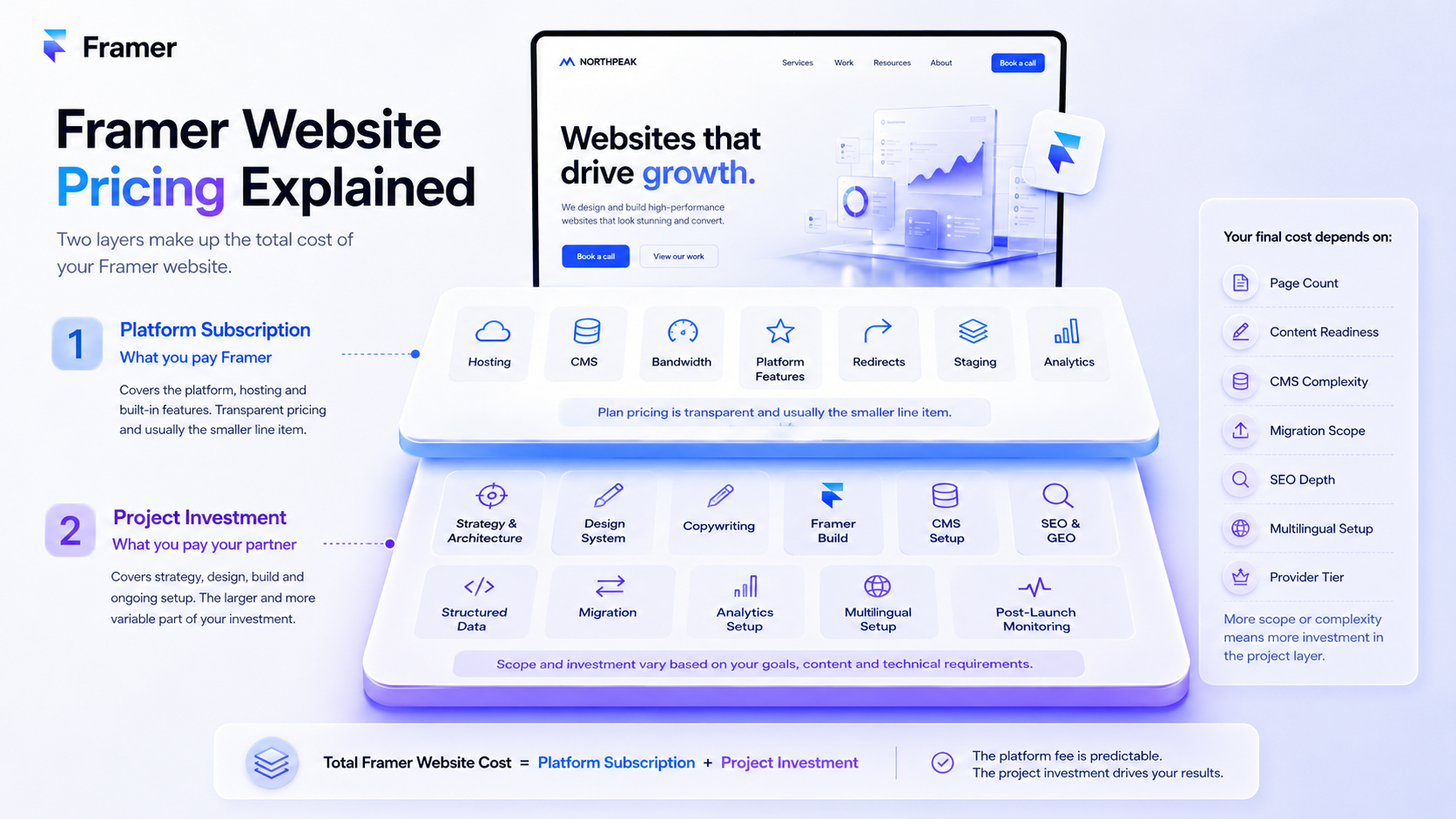
That gap is the problem this post solves. Framer pricing has two layers that most people conflate: the platform subscription you pay Framer directly, and the project investment you pay whoever builds and maintains the website. The first is transparent. The second is where buyers get burned - not by dishonest agencies, but by scope assumptions that don't match between sides of the table.
We Optimizz builds Framer websites and quotes Framer projects regularly. This post explains how the pricing actually works, what drives the variance, and what to ask before you commit. No fixed project prices - because fixed ranges without scope context create more confusion than clarity. What you'll get instead is the framework that lets you read any quote and know whether it's reasonable.
For the broader strategic context on Framer as a platform, our team covers it in the complete Framer website design and SEO guide.
The two layers of Framer pricing
Every Framer website has two cost layers. Most pricing posts mix them; the variance lives in keeping them separate.
Layer 1: Framer platform pricing.
What you pay Framer for the privilege of publishing a site on their infrastructure. This includes the plan tier (currently Free, Basic, Pro, Scale, and Enterprise), editor seats beyond the included number, locale fees if you publish in multiple languages, and usage-based add-ons on the Scale tier (extra bandwidth, additional CMS items, A/B testing events).
Layer 2: Project pricing.
What you pay whoever builds the site. This includes strategy, design, copywriting, build, schema, redirects if migrating, analytics setup, and post-launch monitoring. It scales with scope - page count, content depth, CMS complexity, integrations, multilingual setup - and with the maturity of whoever is delivering it.
Layer 1 is published. You can verify it in two minutes on framer.com. Layer 2 isn't published anywhere because it can't be - every project has different scope drivers, every provider has different overhead, and every market has different rates.
The cost-conscious mistake is optimising Layer 1 while underestimating Layer 2. The Framer plan is rarely the meaningful cost; the project work is.
Layer 1: how Framer's platform pricing actually works
Framer charges per site, not per workspace. Each project published to a custom domain needs its own plan. You can manage multiple sites from one account, but each one carries its own subscription.
Plan limits and included features change over time, so treat what follows as a decision framework rather than a live feature table - verify specifics on Framer's pricing page before purchase.
The five plan tiers serve different scenarios:
Free for non-commercial use, learning the platform, and prototyping. Sites publish on a framer.website subdomain with Framer branding. No custom domain.
Basic for personal portfolios, freelance sites, and simple landing pages. Custom domain, limited CMS, modest bandwidth.
Pro for most professional business websites that need higher limits, redirects, staging, advanced analytics, and more room for CMS-driven content.
Scale for agencies, startups, and scale-ups running their full marketing stack on Framer. High limits, advanced analytics, A/B testing as a paid add-on, additional configuration options.
Enterprise for organisations needing SSO, custom security configurations, dedicated support, and high CMS volumes.
Beyond the headline plan price, Framer adds modular costs that can change the maths significantly:
Editor seats. Each plan includes a fixed number of editors. Beyond that, you pay per additional seat. Agencies and teams that add client editors for self-service content updates can find this multiplies quickly.
Locales. Each additional language adds a per-locale fee. Multilingual projects scale linearly here.
Add-ons (Scale plan). Bandwidth overages, extra CMS items, A/B testing events, custom domain proxying - all priced per usage unit on top of the plan.
Annual vs monthly billing. Monthly billing is meaningfully more expensive than annual across the paid tiers. If you're committed to the project, annual billing is usually the cleaner budgeting choice.
For many professional business websites, Pro is the tier teams evaluate first. Basic may be enough for simple portfolios and landing pages, while Scale becomes relevant when traffic, CMS volume, or marketing sophistication push past Pro's ceilings.
Layer 2: what drives project pricing variance
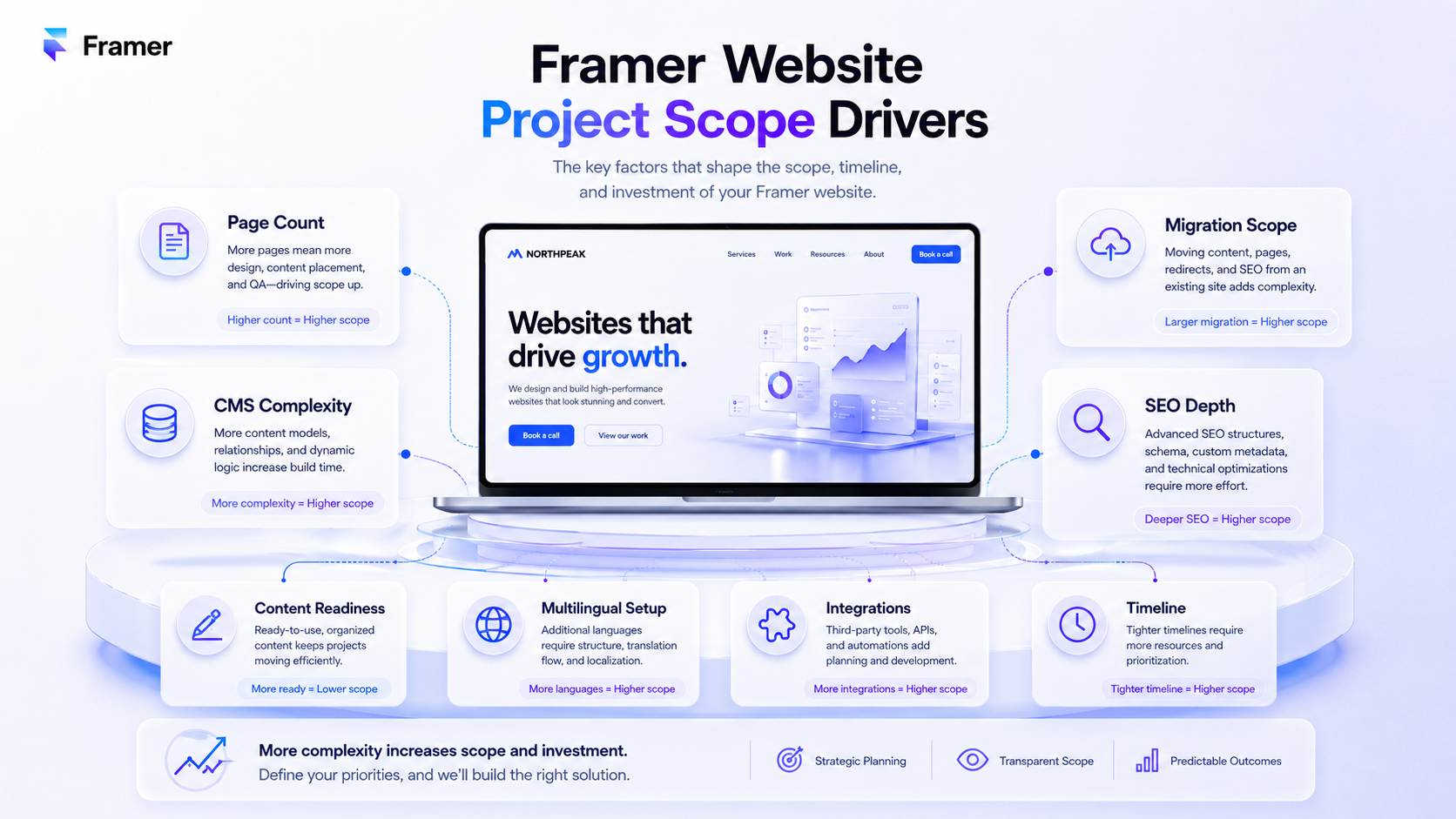
This is where most pricing posts wave their hands. Here's what actually moves the number.
Scope of pages. A five-page marketing site is a fundamentally different project from a thirty-page site with case studies, blog, team pages, and service pillars. Page count drives design hours, copywriting hours, CMS configuration, schema implementation, and internal linking work. Most "Framer website" projects sit between these poles, but the difference between five and thirty pages can multiply the budget because architecture, templates, content, QA, schema, and internal linking compound.
Content readiness. If you arrive with finished copy, brand guidelines, and approved imagery, the project ships faster. If the agency has to produce keyword research, content briefs, copywriting, and image direction, that work is real and gets quoted. The single biggest cost-control lever buyers ignore: showing up with content ready.
CMS complexity. A simple blog with one collection is straightforward. A site with case studies, team profiles, service detail pages, multilingual variants, and cross-linked CMS relationships is structural work. CMS template design, schema templating, and editorial workflow setup are where moderate projects become significant ones.
Migration scope. Replacing an existing site adds redirect mapping, metadata migration, content audit, internal link restructuring, and post-launch indexation monitoring. Migration risk is where DIY projects most often destroy SEO equity, and where experienced migration work prevents expensive ranking and traffic losses. We cover the full process in the Framer migration guide.
SEO and GEO depth. A Framer site without an SEO strategy is unlikely to compete for valuable commercial keywords. Real keyword research, topical clustering, schema implementation, and GEO formatting for AI search visibility are billable work. Agencies that include this as standard quote higher than agencies that bolt it on later - and the higher quote can be the cheaper outcome when it prevents SEO rework, migration losses, and post-launch fixes.
Custom animation and interaction design. Framer's animation primitives are a competitive advantage, but bespoke motion design takes time. A site with five hand-crafted scroll animations costs more than a site that uses Framer's defaults well.
Multilingual setup. Each additional language multiplies copywriting, design QA, locale configuration on Framer's side, hreflang implementation, and ongoing content maintenance. Multilingual is rarely a small add-on - it's structurally more expensive than buyers expect.
Integrations. Forms tied to CRMs, calendars, payment processors, membership tools, analytics platforms, marketing automation. Each integration is configuration and testing work. Stack complexity drives hours.
Provider tier. Solo freelancers, small studios, mid-tier agencies, and full-service growth agencies quote different rates for the same scope because their delivery models differ. A freelancer might quote half a small studio's price and deliver 80% of the same outcome - or 40%, depending on the freelancer. Agency tier isn't a quality guarantee; it's a delivery model with different trade-offs.
Why two quotes for "the same project" can be several times apart
When you get quotes that are several multiples apart for what feels like the same scope, none of the providers are necessarily wrong. They're working from different assumptions about what's included.
The lower quote often assumes:
you provide finished copy
you provide finalised brand assets
the agency works from an existing template or pre-built component library
SEO is your problem
structured data isn't included
migration is a separate project
post-launch support is hourly
revisions are limited
The higher quote often assumes:
the agency does keyword and entity research
the agency writes the copy
design system is built from scratch
SEO architecture is planned before design
structured data is implemented across the site
migration including redirect mapping is included
30-day post-launch monitoring is included
two or three rounds of revisions are included
Both can be defensible. The buyer's job is to know which quote matches which scope, not to assume the lower number is the same deliverable.
The free SEO scan we offer takes the guesswork out of one part of this - if you want to see what a Framer site needs to address before quoting, run a free SEO scan and the report can surface technical, content, and indexation gaps that should be discussed before any agency quote is finalised.
Hidden costs buyers underestimate
A few costs that show up in the second invoice and surprise people:
Ongoing SEO and content production. Building a site that ranks is different from maintaining a site that keeps ranking. Most projects need ongoing content production, internal linking expansion, and technical SEO maintenance after launch. This is a separate engagement from the build.
Editor seat creep. Adding client editors to a Pro plan for self-service content updates is convenient until you realise each one carries a monthly fee. Multi-team workspaces hit this fast.
Framer add-on usage. Bandwidth overages, additional CMS items, A/B testing events on Scale - these are usage-priced and scale with success. They're rarely meaningful early but become relevant for high-traffic sites.
Template cleanup. A purchased template can reduce design cost, but adapting it properly still takes time: removing unused sections, rewriting copy, replacing CMS structures, adjusting responsive behaviour, and making the design feel ownable. Buyers often underestimate this.
Re-platforming costs. If you start on Framer and outgrow it (happens for content-heavy or e-commerce-heavy businesses), the migration cost away is real. Choosing the right platform from the start is cheaper than picking the convenient platform and paying to leave.
Maintenance and updates. Framer's platform evolves. Some changes are seamless; some require attention to existing implementations. Sites with significant custom code or complex schema may need periodic review.
How to budget for a Framer website project
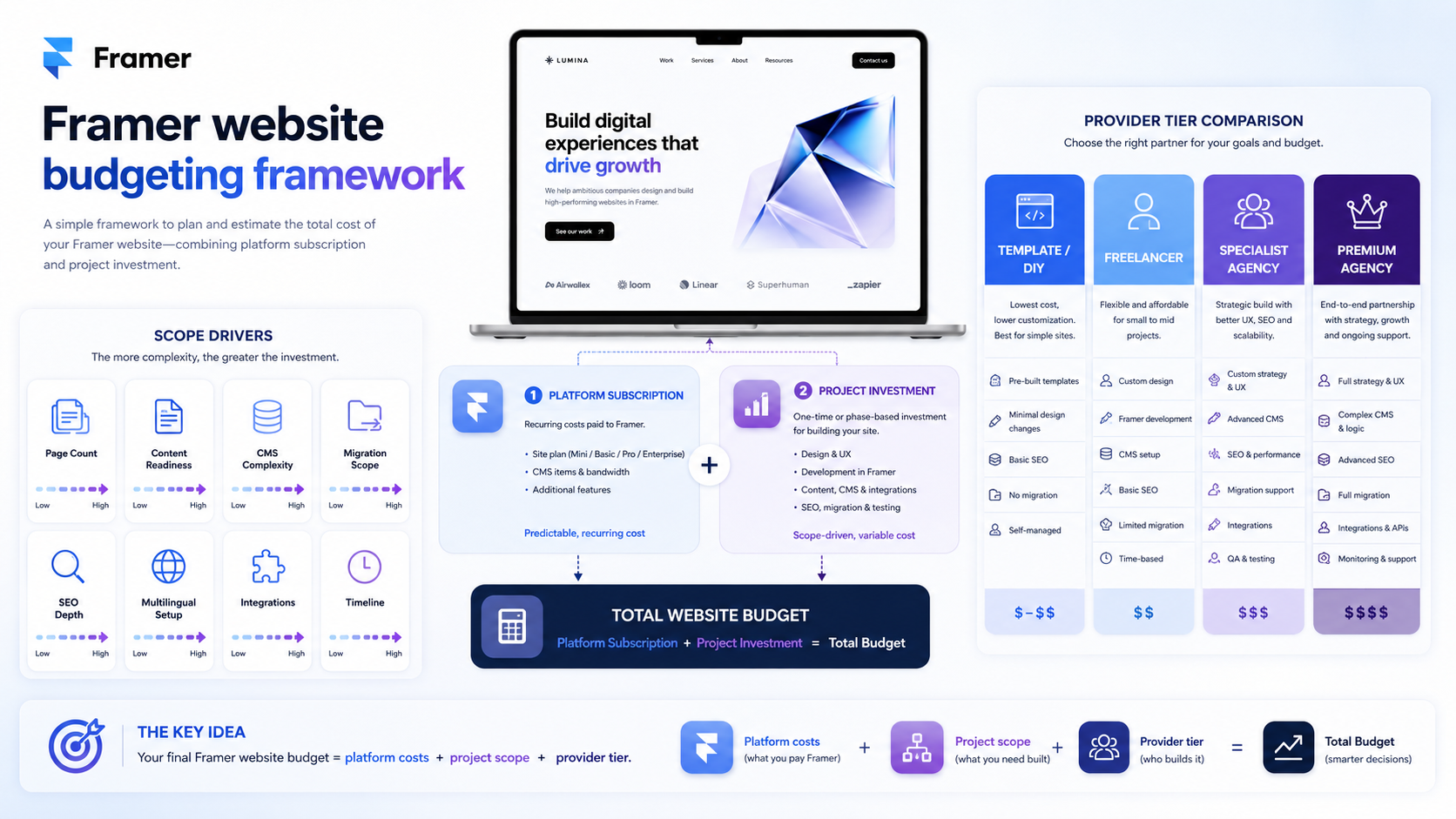
Without publishing fixed ranges, here's the framework that produces realistic budgets:
Start with the business outcome.
What does the website need to do - generate leads at what volume, support what sales cycle, rank for what competitive keywords, convert what percentage of traffic? The answer scales the budget.
Decide DIY, freelancer, small studio, or full-service agency.
Each tier has different pricing logic. DIY costs your time. Freelancers cost their hours. Studios cost their hours plus overhead. Full-service agencies cost their hours plus strategy, multiple specialists, and accountability for outcomes. Pick the tier whose outcome model matches your business stakes.
List the scope drivers honestly.
Page count, CMS complexity, migration, multilingual, integrations, custom animation, ongoing SEO. Don't pretend the project is smaller than it is to reduce quotes - you'll get back-quoted at delivery time.
Add a contingency buffer.
Last-minute scope changes, additional revisions, unforeseen integrations, and content delays happen in most projects. Many teams use a 15–20% buffer; the exact number matters less than budgeting for the buffer at all.
Separate the build from the ongoing programme.
A great launch with no maintenance plan is a depreciating asset. Budget for build plus 6–12 months of post-launch SEO and content if rankings matter.
We Optimizz quotes against scope, not against page count alone. If you want a scope-based estimate for your project, book a discovery call - twenty minutes of scope conversation produces a more accurate number than any published range.
How We Optimizz quotes Framer projects
We Optimizz has delivered 894 websites across 35+ countries and holds a 4.9/5 rating across 96 reviews.
Our team has completed 299 Wix Marketplace projects, is a Wix Legends Partner since 2022, and is Semrush Certified. We run platform-agnostic SEO programmes across Wix Studio, WordPress, Shopify, and Framer.
Our Framer quoting approach:
discovery call to understand business goals, current state, and competitive context
scope definition covering pages, CMS, migration, multilingual, integrations, and SEO/GEO depth
fixed-price quote for the build phase, transparent about what's included and what isn't
separate quote for ongoing SEO and content programme if relevant
no surprises - additional scope is quoted before work starts, not after
That approach helps buyers compare proposals on scope and quality rather than headline price alone. Buyers who can compare quotes against the same scope can compare them on substance.
If your Framer project is at the quoting stage and you want a second opinion on what's reasonable, the discovery call is the fastest way there. If you're earlier and want to test whether your current site has the technical foundation right before investing in a rebuild, the free SEO scan is the lower-friction starting point.
Key takeaway: Framer pricing has two layers. The platform subscription is transparent and rarely the meaningful cost. The project investment is where variance lives - driven by page count, content readiness, CMS complexity, migration, SEO depth, and provider tier. Quotes that look several multiples apart are usually quoting different scopes, not different prices for the same scope. Knowing that distinction is what separates buyers who get value from buyers who get burned.
FAQ
How much does a Framer website cost?
It depends on scope. The Framer platform subscription is published on Framer's pricing page and is rarely the meaningful cost. The project investment scales with page count, content readiness, CMS complexity, migration scope, SEO depth, multilingual setup, and provider tier - apparent variance between quotes is often caused by different assumptions about what is included.
What's the difference between Framer plan pricing and Framer website project pricing? Framer plan pricing is what you pay Framer for hosting, CMS, bandwidth, and platform features. Project pricing is what you pay whoever designs, builds, and optimises the site. Plan pricing is transparent and usually the smaller line item; project pricing is the larger and more variable investment.
Which Framer plan do I need for a business website?
Pro is often the first tier to evaluate for professional business websites - it includes adequate page count, CMS capacity, redirects, staging, and advanced analytics. Scale becomes relevant for high-traffic sites, complex CMS architectures, or full marketing-stack use. Basic suits simple portfolios and landing pages.
Why are Framer agency quotes so different for the same project?
Different agencies include different scope by default. A lower quote may exclude SEO, copywriting, schema, migration, and post-launch monitoring. A higher quote may include all of them. Comparing quotes requires comparing scopes, not headline numbers.
Is Framer cheaper than WordPress?
Framer can be comparable to managed WordPress hosting plus essential plugins, but total cost depends more on scope, provider, maintenance, and content needs than on platform choice. Framer is often faster to launch with less configuration overhead.
Should I buy a Framer template to save money?
Templates can reduce design hours significantly, especially for straightforward marketing sites. The trade-off is differentiation and cleanup work - if many businesses use the same template, your site looks like theirs, and adapting it properly still takes real time. For positioning-critical brands, custom design is often easier to justify; for utility sites, templates can make sense.
Author bio
Barry Roodnat is the founder of We Optimizz, a Wix Legends Partner since 2022, Semrush Certified SEO Specialist, and recipient of the Wix Developer Award. He builds platform-agnostic websites across Wix Studio, WordPress, Shopify, and Framer, with SEO and GEO as the foundation rather than an afterthought. LinkedIn
Websites that
launch and convert.
We build Framer sites that rank, load fast, and turn visitors into clients. Strategy first. Design second. Results always.
Deliverables
Meta title: Framer Pricing Explained: Platform & Project Costs | We Optimizz (64 chars)
Meta description: Framer pricing explained: how platform costs and project costs work, what drives variance between agency quotes, and how to budget for a Framer website. (155 chars)
Schema: Article + FAQPage (in JSON-LD geen markdown-links opnemen in FAQ-antwoorden)
URL slug: /post/framer-pricing
H1: Framer Pricing: What a Framer Website Actually Costs (53 chars)
Internal links (in body, with anchor text):
/post/framer-website-design-seo - "the complete Framer website design and SEO guide" (intro)
/post/migrate-to-framer - "the Framer migration guide" (scope drivers sectie)
/free-seo-scan - "free SEO scan" (twee keer: scope-comparison sectie + closing)
Calendly: https://calendly.com/we-optimizz/discovery-call - "book a discovery call" (budgeting sectie)
CTA placement:
Mid-post soft CTA in "Why two quotes can be several times apart" → /free-seo-scan
Mid-late CTA in "How to budget for a Framer website project" → Calendly
Closing dual CTA in "How We Optimizz quotes Framer projects" → beide links
GEO extraction quote (Key takeaway, in body):
Framer pricing has two layers. The platform subscription is transparent and rarely the meaningful cost. The project investment is where variance lives - driven by page count, content readiness, CMS complexity, migration, SEO depth, and provider tier. Quotes that look several multiples apart are usually quoting different scopes, not different prices for the same scope. Knowing that distinction is what separates buyers who get value from buyers who get burned.
Authority figure placement:
Service set (894 websites, 35+ countries) → "How We Optimizz quotes Framer projects", eerste alinea
Trust set (4.9/5, 96 reviews, 299 Marketplace projects) → zelfde sectie, gesplitst over twee alinea's
Status set (Wix Legends Partner since 2022, Semrush Certified) → tweede alinea van die sectie
E-E-A-T elementen voor deze post:
✅ Author byline + bio
✅ Last updated date (extra belangrijk voor pricing-content)
✅ Reading time (~10 min)
✅ Reviewer credit
✅ Trust signals near top
❌ Table of contents
Image alt-texts:
Image 1 (na intro): Framer pricing two-layer structure with platform subscription and project investment breakdown (96 chars)
Image 2 (onder Layer 2 sectie): Framer website project scope drivers including pages CMS migration and SEO depth (81 chars)
Image 3 (onder budgeting sectie): Framer website budgeting framework with scope drivers and provider tier comparison (83 chars)
6 fixes verwerkt:
"all comparable in one screen" → "easier to compare than agency quotes"
"five times the budget" → "multiply the budget because architecture, templates, content, QA, schema, and internal linking compound"
"higher quote is usually the cheaper outcome" → "can be the cheaper outcome when it prevents SEO rework, migration losses, and post-launch fixes"
"Multilingual is rarely '10% more'" → "rarely a small add-on"
"precise estimate" → "scope-based estimate"
FAQ "transparent and modest" → "transparent and usually the smaller line item"
Publish-ready. Volgende ronde audit zou diminishing returns zijn - we zitten op 8.8/9.0 territorium en elke verdere fix verzwakt de wedge meer dan het score verhoogt.